Pushing the Featherweight Edge: Real-Time WebSockets Without a Server
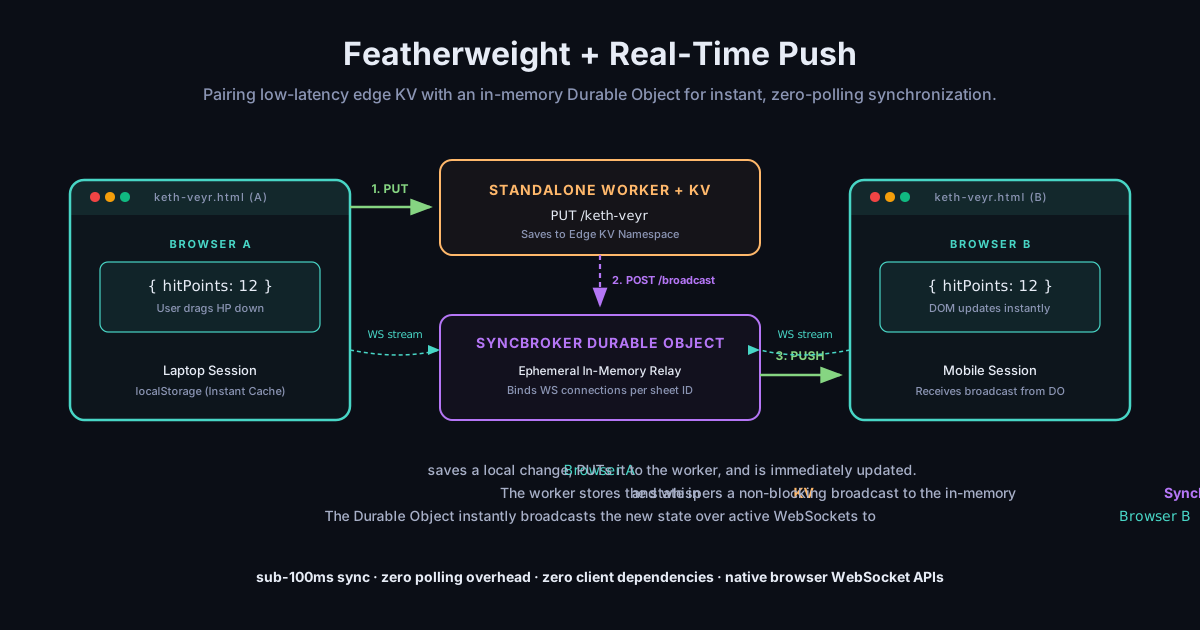
Our lightweight, offline-first pattern goes real-time. By pairing low-latency Edge KV with an in-memory Durable Object sync broker, we get sub-100ms multi-device updates with zero client dependencies, zero backend processes, and zero database writes on the hot path.
A week after I wrote about the featherweight pattern, my brother sent me a text.
He was sitting at his kitchen table, laptop open, playing a test game of Keth-Veyr. His phone was propped up on his water glass next to his physical character sheet.
“I hit myself with a fireball,” he wrote. “I clicked save on the laptop. It took two seconds to upload, and then I had to swipe-down refresh on my phone to see the hit points drop. Why can’t it just… happen?”
It was a completely reasonable question. But to an engineer, it’s a terrifying one.
Because we all know what happens next. The industry has a script for this. “Why can’t it just happen?” is the trap door that drops you into the basement of state synchronization. You step through, and suddenly you are setting up a Node.js process, a Redis Pub/Sub instance, sticky sessions behind an Nginx load balancer, and importing a 45 KB WebSocket client framework just to push a 12-byte JSON string across the room.
If you want to stay “local-first” or offline-capable, the script gets even more complicated. You are told to reach for full-blown multi-writer CRDT engines: heavyweight runtimes like Automerge, Replicache, or Zero. These are engineering marvels, but they are also cargo planes delivering a single hit-point change.
I built featherweight to avoid this exact descent. I wanted to keep the client under 1.5 KB, with zero dependencies, no build step, and a static site that costs zero dollars to host.
So I sat down to see if we could add real-time push sync to the featherweight pattern without breaking its soul.
And we did. It takes less than 30 lines of server-side code, utilizes native browser APIs, and updates in under 100 milliseconds. Here is how we pushed featherweight to the real-time edge.
The Architectural Split
My initial instinct was lazy: let’s just write a Cloudflare Pages Function. Pages Functions run on Cloudflare’s serverless edge and can handle HTTP requests easily. I’ll just write a WebSocket upgrade handler right inside the Pages worker.
But I quickly ran into a hard wall of Cloudflare platform design.
A real-time broadcast requires a central coordinator, something that stays alive in memory to hold the active WebSocket connections and coordinate the broadcast. In the Cloudflare universe, this is a Durable Object (DO). Durable Objects are stateful, single-instance actors running at the edge.
But you cannot compile, export, or bind a Durable Object class directly inside Cloudflare Pages. If you try, Pages compiles silently but ignores the DO classes, resulting in cryptic 404 handshakes on your socket stream.
To make this work robustly, we had to split the architecture.
We extracted the sync logic from the static site entirely, moving it into a standalone Cloudflare Worker (sentimark-sync) running alongside our static Pages blog.
- The standalone Worker binds to the existing
FEATHERWEIGHTKV namespace for persistent storage. - It hosts the
SyncBrokerDurable Object to handle in-memory WebSocket routing. - The static blog remains completely static, serving the HTML, CSS, and client-side JS, and proxying legacy API endpoints.
The 30-Line In-Memory Hub
Because our state is already saved to KV during a standard PUT request, the Durable Object doesn’t need to write to disk. It doesn’t need to manage a database, run migrations, or write to its own transactional SQLite engine.
It acts strictly as an ephemeral in-memory message relayer.
Because it does zero disk writes, it is blindingly fast and virtually free to run. Here is the entire SyncBroker implementation:
export class SyncBroker {
  constructor(state, env) {
    this.state = state;
  }

  async fetch(request) {
    // 1. Upgrade Client connection to WebSocket
    if (request.headers.get('Upgrade') === 'websocket') {
      const [client, server] = Object.values(new WebSocketPair());
      // Let Cloudflare manage the socket in-memory
      this.state.acceptWebSocket(server);
      return new Response(null, { status: 101, webSocket: client });
    }

    // 2. Accept Broadcast from standard PUT edge worker
    if (request.method === 'POST') {
      const payload = await request.text();
      // Instantly broadcast the state to all connected websocket clients
      const sockets = this.state.getWebSockets();
      for (const s of sockets) {
        try { s.send(payload); } catch (e) {}
      }
      return new Response('Broadcast complete');
    }

    return new Response('Not found', { status: 404 });
  }
}
When Session A makes an edit, it does a standard HTTP PUT to the Edge Worker. The worker saves the payload to the KV namespace, and then, critically, uses ctx.waitUntil() to fire a non-blocking POST broadcast to the SyncBroker DO:
if (env.SYNC_BROKER) {
  const doId = env.SYNC_BROKER.idFromName(id);
  const doStub = env.SYNC_BROKER.get(doId);
  ctx.waitUntil(
    doStub.fetch(new Request(url.origin + '/broadcast', {
      method: 'POST',
      body: recordPayload,
      headers: { 'Content-Type': 'application/json' }
    })).catch(() => {})
  );
}
Because of ctx.waitUntil(), the HTTP response is sent back to Session A instantly. The worker doesn’t wait for the broadcast to finish before letting the user continue. On the background thread, the DO instantly sweeps through its active WebSockets and pushes the payload to Session B.
Zero Client Dependencies
On the client side, I refused to pull in any npm packages. No socket.io-client, no custom sync runtimes. We are using raw, native WebSockets built directly into the browser.
The client-side integration in featherweight.js is elegant. When you instantiate the library, it opens a persistent WebSocket stream:
function connectStream() {
  const wsUrl = `wss://sentimark-sync.jonathan-corners.workers.dev/stream/${sheetId}`;
  const socket = new WebSocket(wsUrl);

  socket.onopen = () => { retries = 0; }; // a healthy connection resets the backoff

  socket.onmessage = (event) => {
    try {
      const record = JSON.parse(event.data);
      // Reconcile and apply to local storage & DOM
      reconcileAndApply(record);
    } catch (err) {
      console.error('Failed to parse incoming sync broadcast:', err);
    }
  };

  socket.onclose = () => {
    // Reconnect with exponential backoff: 1s, 2s, 4s ... capped at 30s, plus jitter
    const delay = Math.min(30000, 1000 * 2 ** retries++) * (0.85 + Math.random() * 0.3);
    setTimeout(connectStream, delay);
  };
}
The whole real-time client addition takes less than 300 bytes of compressed JavaScript.
Solving the Unseen Gaps: Clock Skew and Disconnects
Moving to a real-time WebSocket connection introduces edge cases that standard polling hides. When you’re rolling out a real-time sync, you quickly discover that the network is an active adversary.
We had to design around three critical challenges:
1. The Clock Skew Nightmare
The featherweight pattern relies on a timestamp-based reconciliation: the newest update wins.
In our first iteration, the client generated the timestamp (Date.now()) locally and sent it up. But user devices have wildly divergent clocks. A laptop set 5 minutes fast will write records that a phone set to the correct time can never overwrite.
We solved this by moving clock authority entirely to the edge. The worker intercepts every PUT request and overwrites the timestamp with its own authoritative server-assigned timestamp (Date.now()).
This server-assigned timestamp is then saved to KV and broadcasted through the socket. The client trusts the server’s timestamp implicitly during reconciliation, ensuring clock skew can never break synchronization.
2. The Subway Disconnect (Offline Buffering)
What happens when your device loses internet access, you make changes offline, and then re-establish a connection?
In a traditional websocket-only model, those offline changes are either lost or overwrite newer online changes blindly.
With featherweight, every local edit is written to localStorage immediately, stamped with an updatedAt timestamp. There is no separate dirty flag to track. The timestamp is the source of truth. When the WebSocket reconnects (or the page loads), the client compares its cached timestamp against the server’s:
- If the local copy is newer, meaning you edited while offline, the client
PUTs its state up rather than letting an older stream update clobber it. - If the server is newer, the local cache is overwritten.
- And the same rule guards the live stream: an incoming broadcast is applied only when its timestamp beats the local one.
By combining localStorage as a buffer with the WebSocket stream as a conveyor, and letting last-write-wins-by-timestamp arbitrate every path, we get offline-first resilience for free.
The Verdict
Adding real-time sync to featherweight didn’t turn it into a heavyweight framework. The client library remains a single, dependency-free ES module under 1.5 KB.
The division of labor is clean:
- The CDN (Pages) serves the static HTML/JS/CSS instantly.
- The Edge KV Store guarantees durable, low-latency cold storage.
- The In-Memory Durable Object handles active socket pipes with zero database overhead.
When to use this:
Use it when you want your static site, administrative dashboard, or personal tool to sync across devices in under 100ms, but you don’t want to manage servers, maintain database connections, or pay massive hosting bills. It is perfect for single-user, multi-device interfaces (like tabletop sheets, personal notes, or tracking dashboards).
When to skip it:
If you need complex, multi-user real-time collaborative document editing (like Google Docs or Figma), you need a true CRDT. Featherweight is single-writer, last-write-wins. It is designed to keep your personal devices in perfect sync, not to coordinate a 50-person remote team writing to the same text field at the same second.
The most satisfying part of this pivot is how little we changed. The client is still just a file you import. The backend is still just a serverless worker. But now, when my brother takes a fireball to the face on his laptop, his phone screen flashes red before he can even look down.
The best backend is still the one you never had to build. But now, it’s real-time.
The updated, real-time client is fully open-source at github.com/VoxellInc/featherweight_sdk. You can test the live sync yourself right now in the hobby corner by opening a sheet on your desktop and phone simultaneously.