kill -9 Is a Feature: Auto-Healing a One-Box ML API Without Root
One box, one 8B model, one reviewer about to reproduce our MTEB numbers, and no sudo. How I made an embedding endpoint quietly fix itself for 72 hours with systemd, a probe that does real work, and the one signal that counts as 'unclean.'
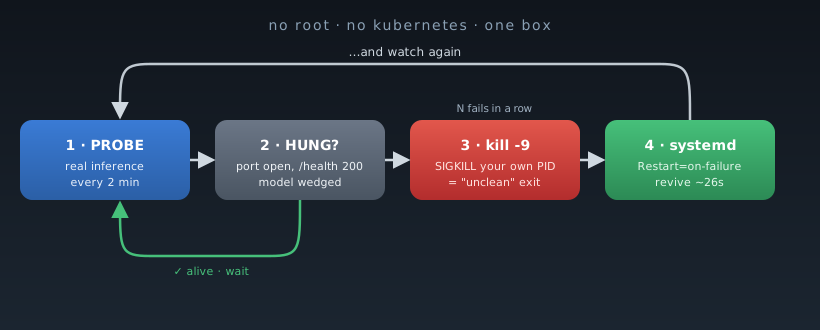
The numbers were real, and that was the problem.
We had an embedding model we believed was about to top MTEB English, and a reviewer had agreed to prove it: reproduce the benchmark against a live endpoint, on their own schedule, over the next three days. That is a wonderful sentence and a terrifying one. Wonderful because someone credible was finally going to confirm the work. Terrifying because “a live endpoint” meant one box I’d stood up by hand. One 8B model behind FastAPI. One public URL through a tunnel. No Kubernetes, no platform team, and the detail that turns this from a chore into a puzzle: no root on the machine.
If the service fell over mid-run, it wouldn’t read as “transient blip.” It would read as broken, and I might not get a second look. So I needed the thing to heal itself for 72 hours while I wasn’t watching, and I had to do it without sudo. Here is what actually worked, including the trick in the title.
The easy half: crashes
A process that crashes is a solved problem. Segfault, unhandled exception, OOM kill: any non-zero exit, and systemd brings it back. The unit had exactly one line that mattered.
[Service]
Restart=on-failure
That’s table stakes, and most people already have it. The trouble is it covers the failure mode least likely to take down a long-running model server.
The half that actually scares me: hangs
The crash is the polite failure. It exits, systemd notices, the service comes back. The one that keeps me up is the hang.
CUDA wedges into a bad state. A batch deadlocks. The event loop jams. And the process is still right there: still running, still holding the port, still answering systemd’s “you alive?” with a cheerful yes. Nothing exited, so Restart=on-failure never fires. From every dashboard’s point of view the service is green. It has simply stopped doing the one thing it exists to do.
So I needed something that would notice a hang and act on it. With no root, “act on it” could not be sudo systemctl restart.
The trick: you are allowed to kill your own process
Here is the detail that unlocks everything.
The service ran as my own user (User=jc), not root. Which means I own that process. I can send it signals all day long, no privilege required.
Now look closely at how systemd decides whether a death counts as a failure under Restart=on-failure. It restarts on a non-zero exit code, or on termination by a signal, with four exceptions it treats as a clean, intentional stop: SIGHUP, SIGINT, SIGTERM, SIGPIPE. Those four mean “the operator meant to do that,” so they do not trigger a restart.
SIGKILL is not on that list.
That asymmetry is the whole post:
kill -TERM <pid>makes systemd read “clean shutdown,” so the service stays down. (The intuitive move, and the wrong one.)kill -9 <pid>is an unclean termination, so systemd restarts it.
So kill -9 stops being the brutal last resort and becomes the remediation primitive. I can’t ask systemd to restart the service, but I can kill my own hung process in a way that makes systemd’s own restart policy do it for me. No sudo, no new privileges, nothing an admin had to install.
The loop, stripped to its bones:
# Probe the model. On N consecutive failures, SIGKILL it and let systemd revive it.
PID=$(systemctl show mteb-serving -p MainPID --value)   # authoritative PID, never pgrep-guess
kill -9 "$PID"                                            # unclean exit -> Restart=on-failure fires
One guard rail worth knowing. systemd’s StartLimitBurst (default: 5 starts within StartLimitIntervalSec, default 10s) will stop restarting if you thrash it. A remediator that kills at most once per probe cycle (mine runs every two minutes) never comes close. Kill in a tight loop and you’ll trip the limit, then cause the outage you built this to prevent.
Your health check is lying to you
I almost pointed the probe at /health. Don’t.
My /health and /v1/models endpoints both returned 200 instantly, and neither one touches the model. They report that the web framework is up. They say nothing about whether inference works. A wedged model returns a happy 200 on both while every real request hangs behind it, so every monitor watching those endpoints glows green straight through a total outage.
The only probe that catches a hang is one that does the actual work:
curl -sS -m 30 http://127.0.0.1:8088/v1/embeddings \
  -H 'Content-Type: application/json' \
  -d '{"input":["liveness probe"],"task_name":"STS12"}'
If that comes back with a real embedding, the model is genuinely alive. If it times out, you’ve caught the exact hang /health was hiding. It costs one tiny inference every couple of minutes, and as a bonus it keeps the model warm.
The rule generalizes: a liveness probe that doesn’t exercise the real work isn’t a liveness probe. It’s an uptime-flavored placebo.
Chaos-test the recovery while it’s cheap
I had the auto-kill loop written, finger over the button, about to wire it into cron. Then I stopped.
An untested remediation is worse than none. If my assumption about SIGKILL then restart was wrong on this particular box, the loop would kill the service and leave it dead. I would have hand-built an outage generator and aimed it at myself.
So while the endpoint was idle, before the reviewer touched it, I ran the experiment for real. Killed the live process. Watched.
killed at 00:29:40Z
[6s]  active   newPID=…          (systemd restarted it)
[20s] active   model_loaded=True (model back, serving)
Six seconds to restart, twenty to reload a 15 GB model. (That reload is fast because of page cache: the weights were still warm in RAM from the previous process, so it wasn’t a cold read off disk.) Now I knew the recovery path worked, with numbers, instead of hoping it would on the one night it mattered.
Chaos-test your recovery when it’s cheap and you’re watching, not when it fires for the first time under load with a reviewer attached.
Defense in depth, by failure domain
The last piece is the one people most often get subtly wrong. Three copies of the same monitor is not defense in depth. The layers only count if each one catches a failure class the others structurally cannot.
I ended up with three. The way to read them is as blast radius: each ring survives the death of everything inside it.
- On-host, every 2 minutes: the kill-and-revive loop above. Catches crashes and hangs. But it runs on the same box, so if the host dies the watcher dies with it and can’t tell you.
- On-LAN, every 3 minutes: a second machine probes the public URL and pings my phone. Catches a dead host or a broken tunnel that layer 1 could never report about itself. But both machines sit in the same building, on the same power and the same network.
- Off-site, every few hours: a tiny scheduled job in the cloud hits the public URL and pages me if it’s gone dark. This is the only layer that survives the whole site losing power, because when the two local watchers go down, they can’t tell you they went down.
That third layer is the real test of whether you have defense in depth: a monitor that shares a failure domain with the thing it watches is not monitoring it. Your on-prem alerting cannot call to tell you the building lost power. Something outside the blast radius has to.
What travels
If you run a model on a box instead of a platform, four things here outlast my specific setup:
Restart=on-failureonly covers crashes. Hangs are the likelier killer for an ML server, and they’re invisible to it.kill -9is a rootless remediation primitive. You own your own process,SIGKILLis “unclean,” and systemd’s restart policy does the work no admin gave you permission to do. (SIGTERMwon’t; it’s classified as clean.)- Probe the real work, not a cheap
/health. If the probe doesn’t run an inference, it cannot see a hung model. - Layer by failure domain. On-host, on-LAN, off-site, each catching what the others can’t. If every layer dies in the same power outage, you don’t have three layers. You have one layer wearing a trench coat.
None of this is fancy. It’s curl, a cron line, and one careful reading of the systemd manual. But it turned a hand-built single-box service into something that quietly fixed itself for three days while I got on with my life. When one important person is watching and you are not, that is the whole game.
One box. One model. Three days of it minding itself.